
Self-service kiosk payment integration is becoming an important part of many unattended service projects.
Today, self-service kiosks are used for ordering, checkout, ticketing, bill payment, check-in, vending, parking, and other commercial services. However, adding a payment terminal to a kiosk involves much more than cutting an opening in the enclosure.
The payment device must work with the kiosk software, operating system, network, power supply, and mechanical structure. At the same time, the design should allow convenient maintenance and future terminal replacement.
For system integrators, software companies, and kiosk solution providers, these details can directly affect deployment cost and long-term reliability.
Therefore, payment integration should be considered early in the kiosk design process.
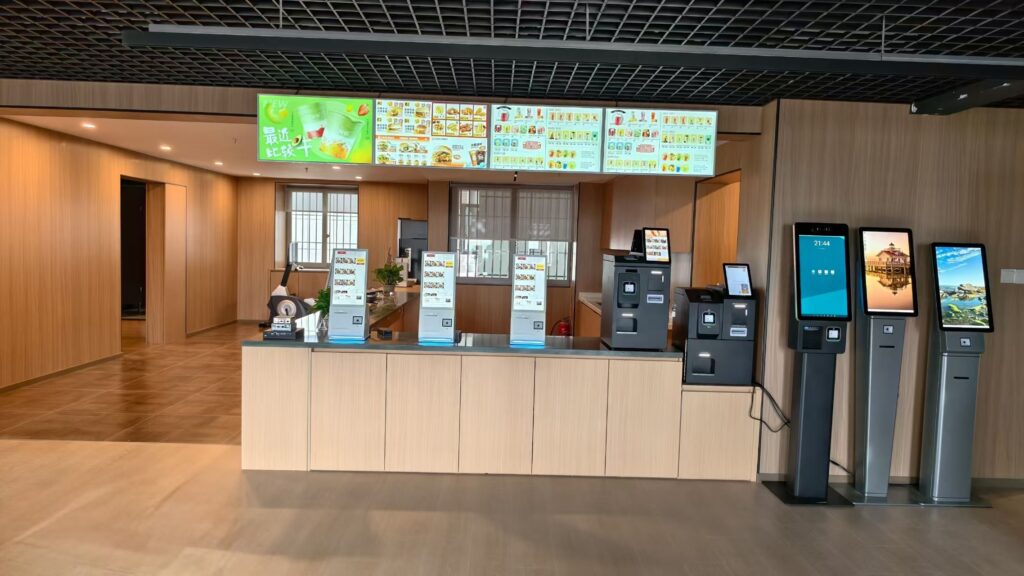
Why Self-Service Kiosk Payment Integration Is Becoming More Important
Unattended payment is expanding into more commercial environments.
One recent example is the strategic partnership announced by Getnet and Nayax in September 2026.
The partnership combines Nayax unattended payment technology with Getnet’s local acquiring network. The rollout is planned to begin in Chile and later expand into Spain, Portugal, Brazil, Mexico, and Argentina.
The companies specifically identified applications such as vending machines, EV chargers, self-service kiosks, and other automated self-service environments.
This does not mean every kiosk project will use the same payment architecture.
However, it illustrates an important challenge for international kiosk projects.
Payment requirements can differ from one country to another. They can also vary between acquiring banks, payment service providers, and payment terminal brands.
As a result, kiosk hardware should be flexible enough to support different payment devices without requiring a complete enclosure redesign.
1. Start with the Payment Architecture, Not the Terminal Opening
One common mistake is to select a payment terminal after the kiosk enclosure has already been designed.
This can create problems later.
For example, the terminal dimensions may not match the original opening. The cable connectors may also require more internal space than expected.
In addition, the contactless antenna may require a different mounting position.
Therefore, the first question should not be:
“What size opening should we make?”
Instead, the project team should first understand how the payment system will work.
In some projects, the kiosk application communicates directly with the payment terminal. In other cases, the terminal communicates with a local payment service or cloud platform.
The selected architecture can affect the operating system, SDK, communication interface, and security requirements.
For this reason, the software company, payment provider, system integrator, and kiosk manufacturer should confirm the integration method before mass production.
This is also why a kiosk should be treated as a complete hardware platform rather than simply a touchscreen enclosure. Our guide to self-service kiosk hardware for different business scenarios explains how the application affects the required peripherals, structure, and installation method.
2. Keep the Payment Terminal Replaceable
A self-service kiosk may remain in service for several years.
During that period, the payment terminal may change.
For example, a payment provider may introduce a new model. A customer may also change acquiring partners when expanding into another country.
In addition, a terminal may eventually reach the end of its product lifecycle.
A fixed payment opening can therefore become a problem.
A more flexible kiosk design uses a replaceable mounting plate or payment terminal bracket.
This allows the main enclosure to remain unchanged while the smaller mounting component is modified.
For OEM and ODM projects, this approach can reduce structural redesign work and shorten development time.
It can also make future maintenance easier.
Therefore, system integrators should ask whether the kiosk can support different terminal sizes and mounting patterns.
The design should also allow technicians to remove and replace the payment device without dismantling the entire kiosk.
3. Plan the Communication Interfaces Early
Payment terminals can use different communication methods.
USB, RS232, Ethernet, and other interfaces may be required depending on the terminal and payment solution.
For this reason, the kiosk mainboard should provide enough I/O for both current and future peripherals.
A typical self-service kiosk may already include a barcode scanner, thermal printer, camera, NFC reader, speaker, and payment device.
Therefore, the project should avoid using every available interface during the first prototype.
Some expansion capacity should remain available.
Cable length and connector location also matter.
A payment terminal installed on a large floor-standing kiosk may require different cable routing from a compact desktop kiosk.
Meanwhile, some devices may require dedicated serial ports rather than USB adapters.
For Windows or Android kiosks, the software team should also confirm driver, SDK, and API compatibility.
These checks are especially important before approving the motherboard for mass production.
4. Consider Contactless Payment and NFC Clearance
Modern payment terminals often support contactless cards and mobile wallets.
However, NFC performance can be affected by the surrounding structure.
Metal panels, brackets, internal components, and other antennas may influence contactless communication.
Therefore, the payment terminal should not simply be installed behind any available opening in a metal enclosure.
The mounting area should be reviewed together with the payment terminal provider.
Where possible, the design should provide appropriate clearance around the contactless area.
The terminal should also be positioned where customers can tap a card or smartphone comfortably.
For larger floor-standing kiosks, installation height becomes another consideration.
The payment location should match the intended user group and application.
This becomes especially important for public-service, transportation, healthcare, and other accessibility-sensitive projects.
5. Separate Payment Certification from Kiosk Hardware Compliance
Payment certification is another area that can create confusion.
The PCI Security Standards Council PTS Point of Interaction standard defines security requirements for devices used to protect PINs, account information, and other sensitive payment-card data.
PCI SSC specifically includes Unattended Payment Terminals (UPT) among the device categories covered by the PTS POI framework.
Therefore, the payment device may need to be selected according to the payment environment, acquiring requirements, and applicable security approvals.
However, using a PCI-approved payment terminal does not automatically mean that the complete self-service kiosk has received the same payment certification.
The kiosk and the payment terminal are different parts of the system.
At the same time, the complete kiosk may have other regulatory requirements depending on the country and configuration.
For example, electrical safety, electromagnetic compatibility, radio functions, environmental requirements, and accessibility rules may apply.
Consequently, system integrators should define the responsibility of each party early in the project.
The payment provider should confirm payment acceptance, acquiring requirements, and payment-device approval.
Meanwhile, the kiosk manufacturer should provide the hardware documentation relevant to the complete terminal.
This distinction can prevent misunderstandings during project approval.
6. Design Secure and Serviceable Cable Routing
Payment integration also affects internal cable management.
In an unattended environment, payment cables should not be easily accessible to users.
At the same time, technicians need reasonable access during installation and maintenance.
Therefore, the enclosure should separate customer-access areas from service areas.
Power and data cables should be routed securely inside the machine.
Connectors should also be protected from accidental movement when technicians replace printer paper or service other components.
For floor-standing kiosks, hidden cable routing can improve both security and appearance.
In addition, a dedicated service door or rear access panel can reduce maintenance time.
The goal is not only to make the kiosk look clean from the outside.
Its internal structure should also make repeated field service practical.
For a closer look at these design considerations, see how SOMANPOS approaches self-service kiosk internal structure and cable management.
7. Plan the Power Supply for All Peripherals
A self-service kiosk usually contains several devices with different power requirements.
The display, mainboard, printer, scanner, payment terminal, camera, speaker, and other modules may require different voltages.
Therefore, the power system should be designed as a complete system.
Adding a payment terminal after the power supply has already been selected may create unnecessary risk.
For example, the total power load may increase during printer operation or system startup.
In addition, some payment devices use their own power adapter, while others receive power through USB or another interface.
The OEM manufacturer should therefore confirm the complete power architecture during the engineering stage.
For commercial projects, stable grounding and suitable electrical protection should also be considered according to the installation environment.
8. Different Markets May Need Different Payment Solutions
A kiosk design that works in one country may require changes in another.
Payment terminal brands, acquiring partners, supported cards, QR payments, and mobile wallets vary between regions.
The recent Getnet and Nayax cooperation is a useful example. The same unattended payment ecosystem is planned to support several countries across Latin America and Iberia, while using local acquiring networks.
This shows why international kiosk projects can benefit from a modular payment design.
The main kiosk platform can remain relatively consistent.
Meanwhile, the payment terminal and mounting module can be adapted to each country.
This strategy may be more efficient than developing a completely different enclosure for every regional market.
It can also help software companies and system integrators reuse one hardware platform across several deployments.
9. Payment Kiosk Hardware Should Support Maintenance and Future Upgrades
Payment hardware is not the only part of a kiosk that needs maintenance.
Receipt printers require paper replacement.
Barcode scanners may need cleaning or replacement.
Touchscreens can also require service after long-term commercial use.
Meanwhile, mainboards, storage devices, cooling components, and power supplies may need maintenance during the product lifecycle.
Therefore, payment integration should not block access to other components.
A well-designed kiosk should allow technicians to reach key modules without removing unrelated parts.
Modular construction can help.
For example, the payment terminal, scanner, printer, and computing module can be installed as separate serviceable units.
As a result, the customer can replace one component without replacing the entire kiosk.
This approach is particularly useful for multi-year deployments.
10. What Should System Integrators Confirm Before Ordering a Payment Kiosk?
Before approving a self-service kiosk for production, system integrators should confirm the complete application rather than only the enclosure appearance.
The project team should identify the deployment country, payment provider, payment terminal model, operating system, required interfaces, mounting method, maintenance method, and expected order quantity.
It should also confirm whether the kiosk requires an 80mm printer, barcode or QR scanner, camera, NFC module, speaker, ID reader, or other peripherals.
The payment terminal’s power requirement should be confirmed as well.
In addition, system integrators should decide whether the payment bracket must be replaceable and whether maintenance access should be from the front or rear.
Accessibility requirements should also be reviewed where relevant.
Finally, both sides should clearly define who is responsible for payment certification and acquiring approval.
Confirming these requirements early can reduce structural changes later.
It can also help the manufacturer recommend the correct mainboard, power supply, interface configuration, and mounting structure.
11. How an OEM/ODM Kiosk Manufacturer Can Support Payment Integration
For software companies and system integrators, working with an experienced OEM/ODM POS and self-service kiosk manufacturer can simplify hardware development.
The manufacturer does not need to become the payment processor.
Instead, its role is to prepare a stable hardware platform that can work with the customer’s selected payment solution.
Depending on the project, OEM/ODM work may include payment terminal brackets, enclosure openings, internal mounting structures, hidden cable routing, interface configuration, printer integration, scanner integration, and customized installation methods.
The manufacturer can also prepare desktop, wall-mounted, or floor-standing structures for different deployment environments.
Before mass production, a complete sample should be assembled with the actual payment terminal whenever possible.
This allows the customer to test software communication, installation, ergonomics, contactless performance, cable routing, and maintenance access.
As a result, integration problems can be identified before a larger production order begins.
For software companies planning more than one type of commercial terminal, it can also be useful to think beyond a single kiosk. Our article on POS hardware for software companies and connected hardware ecosystems explains how POS terminals, kiosks, handheld devices, KDS displays, printers, scanners, and customer displays can support one broader software solution.
12. SOMANPOS Self-Service Kiosk Hardware for OEM/ODM Projects
SOMAN TECHNOLOGY CO., LTD. provides self-service kiosk hardware for software companies, system integrators, distributors, and project partners.
Available configurations can support different screen sizes, Windows or Android computing platforms, 80mm thermal printers, barcode and QR scanners, cameras, NFC modules, payment terminal mounting, and other peripherals according to project requirements.
For example, SOMANPOS offers self-service ordering and payment kiosk hardware with touchscreen, embedded receipt printer, QR scanner, and customizable computing configurations.
Different installation structures can also be discussed, including desktop, wall-mounted, and floor-standing designs.
For payment projects, customers can provide the payment terminal model, installation drawing, software requirements, target market, and required peripherals.
SOMANPOS can then review the enclosure structure, interfaces, cable routing, power requirements, and peripheral layout together with the customer.
This allows the payment provider to focus on payment acceptance and transaction processing.
Meanwhile, the kiosk hardware can be customized around the requirements of the complete application.
Conclusion: Design the Kiosk Around the Payment Ecosystem
Self-service kiosk payment integration should not be treated as a last-minute peripheral addition.
The payment terminal affects enclosure design, interfaces, power, cable routing, software communication, maintenance, and regional deployment.
Therefore, software companies and system integrators should confirm the payment architecture before approving the final kiosk structure.
A modular design can make this process easier.
It allows payment devices to change without redesigning the complete machine.
It can also help one kiosk platform support different payment partners and regional markets.
For international self-service projects, this flexibility can reduce engineering work and simplify future expansion.
If you are developing a self-ordering, self-checkout, payment, ticketing, check-in, or other self-service solution, contact SOMANPOS to discuss a suitable OEM/ODM kiosk configuration.
Share your application scenario, operating system, preferred screen size, payment terminal model, required peripherals, installation method, and estimated quantity. Our team can then review the hardware requirements for your project.


