
Self-service kiosk hardware is not only designed for quick-service restaurants.
Today, more businesses use kiosks to support self-ordering, self-checkout, information inquiry, ticketing, membership registration, queue management, payment, and customer interaction. From retail stores and supermarkets to hotels, healthcare facilities, public service areas, transportation terminals, and commercial buildings, kiosk hardware now plays an important role in front-end service operations.
However, software alone cannot create a good kiosk project. Stable, practical, and well-designed hardware also plays a key role.
Software defines the workflow. Hardware brings that workflow into real business use.
For POS software companies, SaaS providers, ISVs, system integrators, distributors, and project partners, the right self-service kiosk hardware can make project deployment easier, more stable, and more scalable.
Self-Service Kiosk Hardware Is More Than a QSR Ordering Machine
When people talk about self-service kiosks, they often think of food ordering first. Restaurants, cafés, and fast-food chains use kiosks to help customers browse menus, place orders, complete payments, and print order tickets without waiting at the counter.
However, kiosk applications go far beyond QSR.
Retail stores use kiosks for product lookup, membership registration, promotion display, and self-checkout. Supermarkets may connect kiosks with barcode scanners, receipt printers, weighing systems, and payment-related peripherals. Hotels use kiosks for self-check-in, information inquiry, and guest service. Public service areas can use them for queue ticketing, document inquiry, identity verification, and payment processing.
Therefore, the value of a kiosk does not belong to one industry only. With the right hardware configuration and software workflow, a self-service kiosk can support many business scenarios.
How Self-Service Kiosks Support Different Business Workflows
Different industries use kiosks in different ways. For this reason, the hardware design and configuration should match the real application scenario.
Retail Stores
Retail businesses can use kiosks to help customers check product information, register as members, browse promotions, or complete simple self-service operations. These devices also help reduce staff pressure during busy hours and improve customer interaction inside the store.
Common hardware options include a touchscreen, barcode scanner, receipt printer, customer-facing display, camera, NFC module, or card reader.
Supermarkets and Convenience Stores
Supermarkets and convenience stores often use kiosks for self-checkout, price inquiry, product lookup, coupon printing, and membership services. In some fresh food or grocery scenarios, the kiosk may also need to work with weighing devices, barcode scanning, or label printing.
In these environments, stability matters because devices often run for long hours every day.
Restaurants and Cafés
Restaurants, cafés, and quick-service businesses often use kiosks for self-ordering, menu display, payment, receipt printing, and order number printing.
For this scenario, the user interface matters, but the physical hardware also affects the experience. Screen angle, printer position, scanner location, camera height, speaker design, and installation method can all influence daily use.
Hospitality and Hotels
Hotels and hospitality spaces can use kiosks for self-check-in, guest information inquiry, room service information, ticket booking, and membership registration.
Depending on the project, the kiosk may need passport scanners, ID readers, cameras, card dispensers, receipt printers, or other hotel-related peripherals.
Public Service Areas
Government offices, community service centers, utility service halls, hospitals, transportation stations, and public facilities can use self-service kiosks to reduce repetitive counter work.
These kiosks may support form submission, document inquiry, queue management, payment, identity verification, and information display.
For public service projects, hardware reliability, security, accessibility, and maintenance convenience are especially important.
Healthcare Facilities
Hospitals, clinics, and healthcare service centers can use kiosks for appointment check-in, patient registration, queue ticketing, information inquiry, and payment.
Healthcare environments often need stable hardware, clear screens, easy operation, and smooth integration with the customer’s own software system.
Transportation and Ticketing
Transportation terminals, cinemas, entertainment venues, tourist attractions, and parking areas can use kiosks for ticket purchase, ticket collection, route inquiry, payment, QR code scanning, and receipt or ticket printing.
For these applications, manufacturers should design the printer, scanner, payment-related peripherals, and overall structure for frequent public use.
Commercial Buildings and Shopping Malls
Shopping malls, office buildings, exhibition halls, and commercial centers can use kiosks for wayfinding, advertising display, visitor registration, information inquiry, and interactive customer service.
In these scenarios, appearance design, screen size, installation method, and user experience are often as important as internal performance.
Why Kiosk Hardware Design Matters for Project Success
A kiosk may look simple from the outside, but the internal design can be quite complex.
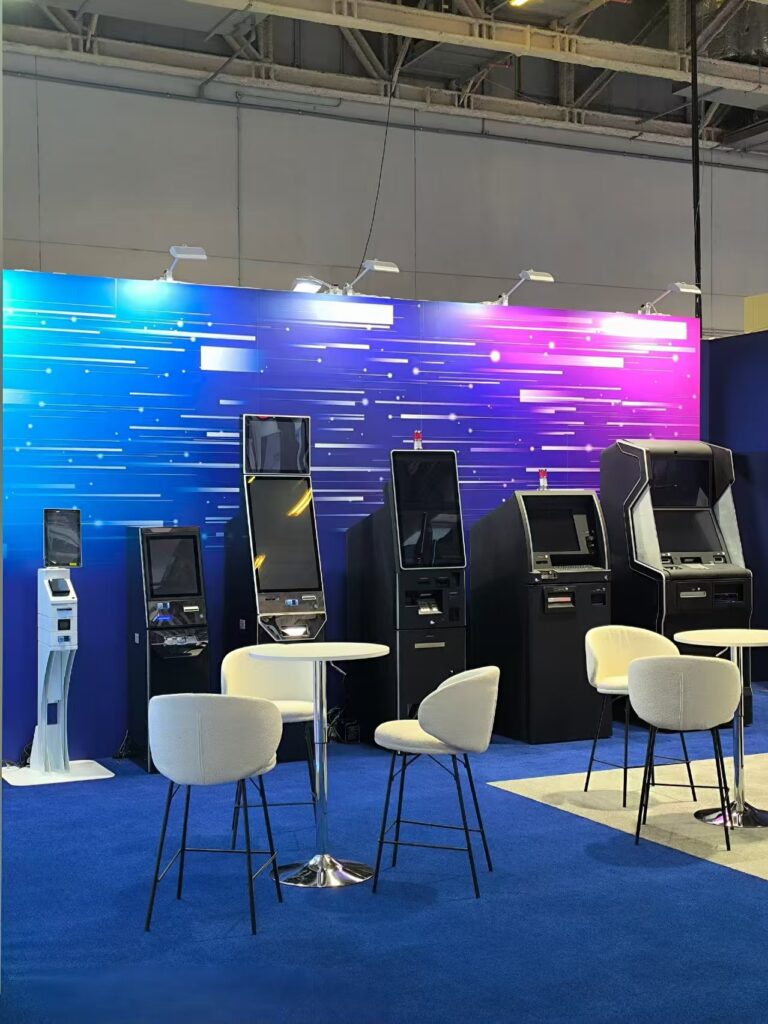
Screen size, cabinet structure, internal wiring, ventilation, printer position, scanner angle, camera height, NFC location, speaker position, maintenance access, and installation method can all affect daily use.
For example, staff may spend more time replacing paper rolls if the printer is difficult to access. Customers may struggle to scan QR codes or barcodes if the scanner angle does not fit the application. Face recognition or video capture may also perform poorly if the camera height does not match the target user group.
Therefore, a good kiosk should not only look modern. It should also remain easy to use, easy to maintain, and practical for the target business environment.
Software Is the Brain, Kiosk Hardware Is the Body
In every kiosk project, software and hardware play different roles.
Software is the brain. It controls the user interface, business workflow, product data, payment logic, membership system, queue process, reporting, and other business functions.
Kiosk hardware is the body. It carries the touchscreen, printer, scanner, camera, card reader, NFC module, speaker, industrial PC, Mini PC, and other components that allow users to interact with the system in the real world.
Without suitable software, a kiosk cannot complete the business workflow. However, without reliable hardware, even good software may fail to deliver a smooth self-service experience.
That is why project teams should consider hardware and software together from the beginning.
What Software Companies and System Integrators Should Consider
For POS software companies, SaaS providers, ISVs, system integrators, and distributors, hardware selection can directly affect project delivery.
Before choosing a kiosk model, it is useful to consider several questions:
Does the kiosk support the required operating system, such as Windows or Android? For Windows-based deployment, businesses can also refer to Microsoft’s official Windows resources.
Can the structure fit the required printer, barcode scanner, QR code reader, camera, NFC module, card reader, speaker, or payment-related device?
Is the screen size suitable for the application scenario?
Does the height match the target users?
Can staff replace the printer paper roll easily?
Does the kiosk support desktop, wall-mounted, or floor-standing installation?
Can the manufacturer supply the same hardware model consistently for future projects?
Does the manufacturer support OEM/ODM customization if the project requires a special structure or module layout?
These questions are not only about hardware specifications. They also affect installation, operation, maintenance, and future scaling.
How SOMAN POS Supports Self-Service Kiosk Hardware Projects
At SOMAN POS, we focus on practical self-service kiosk hardware for different commercial and public service scenarios.
Our kiosk hardware supports different screen sizes, touchscreen types, printers, barcode scanners, QR code readers, cameras, NFC modules, card readers, speakers, payment-related peripherals, Mini PCs, industrial PCs, and installation structures.
We offer different forms, including desktop kiosks, wall-mounted kiosks, floor-standing kiosks, and customized kiosk hardware based on project needs.
As an OEM/ODM hardware manufacturer, we work with POS software companies, SaaS providers, ISVs, system integrators, distributors, and project partners who need reliable kiosk hardware for their own software platforms or end-customer projects.
Our role is clear. We do not replace the software provider. Instead, we build the hardware foundation that helps software perform better in real business environments.
Hardware and Software Work Best Together
A successful kiosk project is not only about a good-looking machine. It is also not only about powerful software.
The real value comes when software and hardware match the business workflow.
For customers, the experience should feel simple. They touch the screen, scan a code, place an order, check information, make a payment, or print a receipt.
However, behind this simple process, every hardware detail matters.
A stable touchscreen, practical cabinet design, well-positioned printer, suitable scanner, clear camera angle, clean internal wiring, and convenient maintenance access can all improve the final user experience.
Final Thoughts
A self-service kiosk should not be seen only as a QSR ordering machine.
With the right hardware design and software workflow, kiosks can support many business scenarios, including retail, supermarkets, restaurants, hotels, healthcare, public service, transportation, ticketing, and commercial spaces.
For software companies, system integrators, distributors, and project partners, reliable kiosk hardware can make deployment easier, operation more stable, and future projects more scalable.
At SOMAN POS, we focus on building practical self-service kiosk hardware that supports different business needs. Whether your project requires a standard kiosk model or a customized hardware configuration, the right kiosk hardware can help bring your software and service experience into the real world.


